
1
Open the Add-ons menu
Open your Google Form and click the puzzle-shaped Add-ons icon in the top toolbar.
 Zetomation
Google Workspace add-on
Create a hosted signing link from a Google Form, collect form answers and a drawn signature, and send the signature URL back to the connected Google Sheets response row.
Bring your supported questions into Zeto Sign.
Collect answers and a drawn signature on a hosted page.
View answers, signatures and available PDFs in your owner dashboard.
Quick start
After installing the add-on, start inside Google Forms. Follow the two highlighted controls below to launch the add-on.
Open your Google Form and click the puzzle-shaped Add-ons icon in the top toolbar.
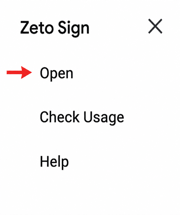
Choose Zeto Sign from the Add-ons menu, then click Open.
After the add-on opens: Sync the form, then use the generated signing link to collect responses and signatures.
Zeto Sign is built for teams that already collect structured information with Google Forms but also need a signature image saved alongside the response. The add-on syncs your form layout, creates a Zetomation signing page, and keeps the response workflow tied to the original form and linked sheet.
Hosted signing links
Sync a Google Form and create a Zetomation-hosted signing page that can be shared with customers, vendors, employees, or internal approvers.
Signature URL in responses
Capture a drawn signature image, store it securely, and write the public signature URL back with the submitted response.
Google Forms response sync
Submit hosted responses back into the original Google Form so the linked Google Sheet receives a standard response row.
Workflow illustration
Signing link
Zeto Sign hosted response
Google Form fields
Name, email, agreement answers, and notes
Signature capture
Drawn signature saved as a hosted image URL
Synced result
Response row appears in the linked Google Sheet
Zeto Sign keeps the form owner workflow simple while preserving the original Google Form as the response destination.
Sync a Google Form and create a Zetomation-hosted signing page that can be shared with customers, vendors, employees, or internal approvers.
Capture a drawn signature image, store it securely, and write the public signature URL back with the submitted response.
Submit hosted responses back into the original Google Form so the linked Google Sheet receives a standard response row.
Use Zeto Sign when a lightweight form response needs a signature image URL stored with the response data.
Collect a signer name, agreement answers, and a signature URL in one response workflow connected to Google Sheets.
Share a signing link for approvals, equipment handoffs, policy acknowledgements, and lightweight internal confirmations.
Use the Google Forms questions your team already manages while adding a hosted signature capture step through Zeto Sign.
Zeto Sign mirrors the form structure on Zetomation and posts completed hosted responses back to Google Forms.
Open a Google Form, launch the Zeto Sign add-on, and sync the form schema to Zetomation.
Zeto Sign returns a hosted signing URL that mirrors the synced form and adds signature capture.
When the signer submits, Zetomation stores the signature image URL and posts the completed response back to the original Google Form.
Open your Google Form, launch the Zeto Sign add-on, sync the form, and share the generated signing link. After syncing, open the native Google Form once so Google activates the response sheet connection.