1
Open the Extensions menu
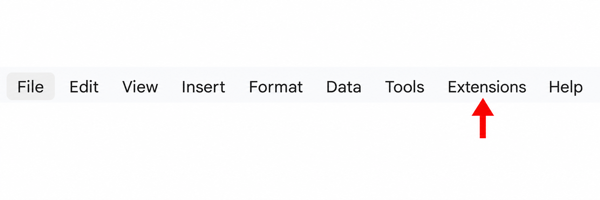
Open your spreadsheet and click Extensions in the Google Sheets top menu.
 Zetomation
Google Workspace add-on
Build if-this-then-that workflows inside Google Sheets. Respond to edits, form submissions, and scheduled cadences with multi-step actions—no Apps Script required.
Start with an edit, a form response or a schedule.
Decide which rows and values match your workflow.
Move data, send alerts or connect a webhook.
Quick start
After installing the add-on, start inside Google Sheets. Follow the two highlighted controls below to launch the add-on.
Open your spreadsheet and click Extensions in the Google Sheets top menu.
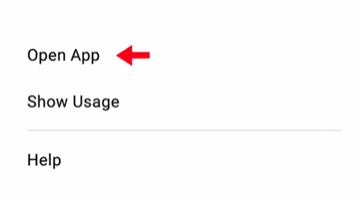
Choose Zeto Sheet Automation from Extensions, then click Open App.
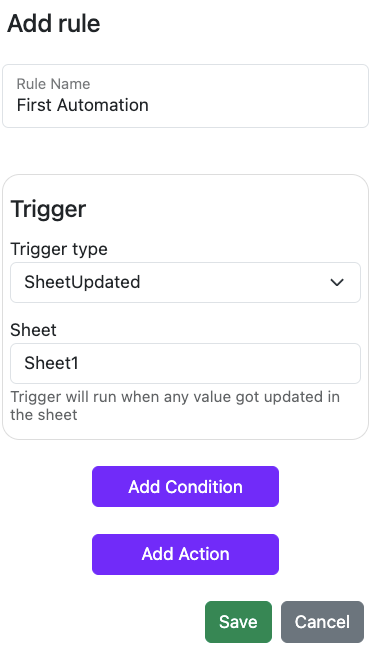
After the add-on opens: Create an automation, configure its trigger, conditions and actions, then save it.
Sheet Automation keeps your spreadsheets aligned without manual upkeep. Configure once and Zetomation will handle the rest— from data hygiene to outbound alerts.
Powerful triggers
Monitor specific rows, columns, ranges, or entire sheets—and schedule automations to run on a timer.
Granular conditions
Layer column, range, and variable logic so automations only run when criteria are met.
Rich action library
Send emails, post to chat, move data between tabs, call webhooks, export PDFs, and more.
Sample automation
When status equals “Closed Won”
Integrations
Email, SMS, Slack, Microsoft Teams, Discord, Google Chat, Telegram, Webhooks, Google Drive exports
Launch automations in minutes and keep your team focused on high-impact work.
Automatically move closed deals to finance sheets, timestamp activities, and archive completed work without manual effort.
Highlight overdue tasks, hide rejected entries, and enforce formatting when statuses change.
Generate daily PDFs, send email digests, or sync curated data to other systems before the workday begins.
Start with a common Google Sheets™ workflow and adapt it to your team's process.
Install the add-on from Google Workspace Marketplace or explore step-by-step guides in the documentation. Zetomation scales from solopreneurs to enterprise Workspace domains.