1
Open the Add-ons menu
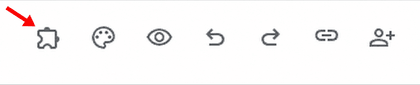
Open your Google Form and click the puzzle-shaped Add-ons icon in the top toolbar.
 Zetomation
Google Workspace add-on
Automate your Google Forms™ with smart conditional logic, dynamic email routing, SMS, chat alerts, webhooks, and custom PDF generation.
Stop manually checking for new form submissions. Zeto Form Notification & Alerts is an enterprise-grade workflow automation tool that instantly routes data to the right people, exactly when they need it. Connect your Google Forms to your team's inbox, generate instant documents, and create "If This, Then That" (IFTTT) rules without writing a single line of code.
Start with the information submitted to your Google Form.
Match conditions and choose the right recipients.
Deliver your configured email, chat alert or document.
Quick start
After installing the add-on, start inside Google Forms. Follow the two highlighted controls below to launch the add-on.
Open your Google Form and click the puzzle-shaped Add-ons icon in the top toolbar.
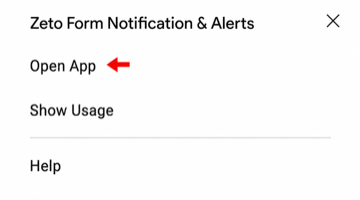
Choose Zeto Form Notification & Alerts from the Add-ons menu, then click Open App.
After the add-on opens: Create a workflow, choose its conditions and recipients, then save it to start processing matching form submissions.
Replace manual triage with conditional routing, auto-responders, and document delivery that happens the moment a submission lands.
🧠 Smart Conditional Logic (IFTTT Routing)
Stop inbox clutter. Use our visual logic engine to route submissions based on how respondents answer specific questions. Support for multiple operators: Equals, Contains, Any of, RegEx Matches, Is Empty, and more.
📄 Instant PDF Generation
Turn simple form responses into professional, downloadable documents. Auto-generate PDF receipts, invoices, onboarding contracts, or support tickets. Customize the PDF layout using a rich HTML template and attach it directly to your automated emails.
✉️ Dynamic, Personalized Emails
Send beautiful confirmation emails to respondents and your internal team. Use {{Dynamic Markers}} to automatically inject the respondent's exact answers, Form Name, or Response ID directly into the email subject line and body.
Example workflow
When a high-value lead submits the form
Works with
Google Forms notifications, conditional routing, SMS, chat alerts, webhooks, PDF generation, and Drive attachments.
From support desks to educators, teams can tailor routing and attachments to fit the job.
Route technical issues to IT and billing issues to Finance.
Instantly notify sales reps when a high-value lead fills out a contact form.
Automatically send PDF non-disclosure agreements or onboarding packets to new hires.
Send personalized PDF certificates when students complete an online quiz.
Stop inbox clutter. Use our visual logic engine to route submissions based on how respondents answer specific questions. Support for multiple operators: Equals, Contains, Any of, RegEx Matches, Is Empty, and more.
Turn simple form responses into professional, downloadable documents. Auto-generate PDF receipts, invoices, onboarding contracts, or support tickets. Customize the PDF layout using a rich HTML template and attach it directly to your automated emails.
Send beautiful confirmation emails to respondents and your internal team. Use {{Dynamic Markers}} to automatically inject the respondent's exact answers, Form Name, or Response ID directly into the email subject line and body.
Need to send a brochure, terms of service, or a welcome packet to someone who fills out your form? Simply paste a public Google Drive™ link, and Zeto will automatically fetch and attach the file to the outgoing email.
Static & Dynamic Recipients: Easily configure TO, CC, and BCC fields. Auto-Responders: Send custom confirmation receipts directly to the person who submitted the form. External Channels: Route matching submissions to SMS, Slack, Discord, Google Chat, Microsoft Teams, Telegram, or custom webhooks.
Compose branded emails, insert dynamic markers, and tailor the subject line for each workflow.
Mix static recipients, auto-responders, conditional rules, and fallback routing in one flow.
Generate PDFs or include Drive files so every submission sends exactly what the recipient needs.
Install the add-on from Google Workspace Marketplace, or review the documentation to map out routing, PDFs, follow-up emails, SMS, chat alerts, and webhook destinations before launch.